The site you are reading does not run on the official default theme. It runs on a site-private theme under themes/, xfmpress-theme-anziyu. The reason was simple: when migrating off Hexo, the thing worth keeping was the look of hexo-theme-anzhiyu — sticky glass navigation, a hero banner, cover cards, a right-hand widget column — so it was rewritten in xfmpress template syntax, with everything unnecessary dropped.
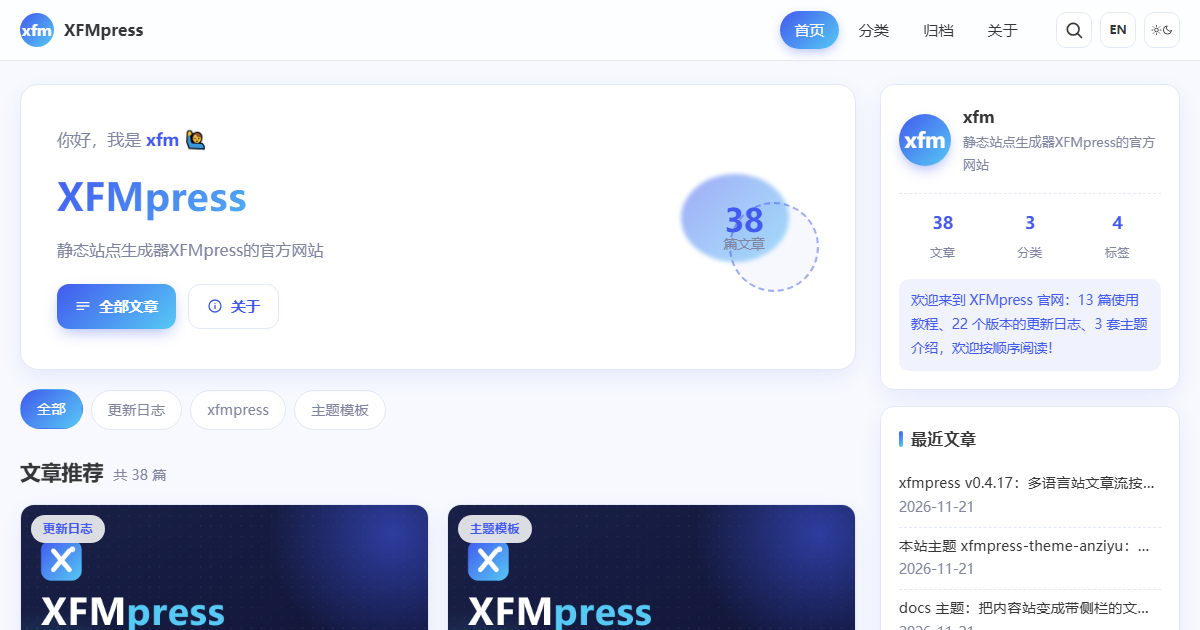
The picture above is an actual screenshot of this site's home page at 1200×630: post stream on the left, three widget groups on the right (site intro with language counts, categories, recent posts). When a post has no cover, the card falls back to a shared default image, so the grid never looks ragged.
Seven layouts, six partials
themes/xfmpress-theme-anziyu/
├── layouts/
│   ├── base.html        # shell: progress bar, nav, main, footer, back-to-top, image mask
│   ├── index.html       # home: hero + category chips + card grid + sidebar
│   ├── post.html        # post: cover banner, body card, TOC, comments, related
│   ├── page.html        # standalone page (about)
│   ├── taxonomy.html    # tag / category / series listings
│   ├── categories.html  # category index
│   └── archives.html    # archive
├── partials/            # navbar / footer / post-card / pager / sidebar / toc
└── assets/              # style.css (~31KB) / main.js / search.js / covers and icons
There is no collection.html — this site has no custom collections; it can be added when needed.
Four visual signatures
Glass navigation. backdrop-filter: blur() over a translucent background, with the surface becoming more opaque and picking up a shadow on scroll; on narrow screens it collapses into a drawer.
Hero banner. On the left a small "hi, I am" line, then the site title and description, plus two buttons (all posts, about). On the right, decorative shapes and a post count from site.langCounts — on /en/ that number is the English post count automatically.
Category chips. A row of rounded chips under the banner, walking site.categoriesZh / site.categoriesEn, one tap to the category page.
Cover cards. Each card opens with a 16:9 cover; posts without a cover fall back to assets/cover-default.png (1200×630, the same image used for OG tags), so the list never shows an empty block. Card text uses post.desc, whose length the engine controls.
The post page: the cover becomes the background
The header is not a white title block. The cover fills it, a gradient mask sits on top, and the title floats there together with breadcrumbs (category + publish date), reading time and tags. Body text lives in a white card, with toc.html on the right — main.js uses an IntersectionObserver to highlight the section currently on screen.
Below the body: the Waline comment section (#waline mount, posts only), related posts from the related plugin, and prev/next links.
Sidebar and footer
Four widget groups: post stats (total plus per-language split), categories (per language), a tag cloud, and recent posts. Every label switches on page.lang === 'en', so English pages never show Chinese strings.
The footer has a copyright line and a "Powered by xfmpress 0.4.17" line — the version is not hard-coded. plugins/engine-version.js reads node_modules/xfmpress/package.json on every build, so upgrading the dependency updates the footer by itself.
All interactions live in 3.8KB
main.js does six things: reading progress bar, back-to-top, mobile menu drawer, TOC scroll highlight, copy buttons on code blocks, and click-to-zoom images via an #img-mask overlay. No framework, loaded with defer, never blocking first paint.
Where to start editing
- Recolour —
--ac(the Anzhiyu blue,#425aef) and--gradat the top ofstyle.css, once for light and once for dark; two lines change the whole site. - Add a widget — append a
section.widgetblock inpartials/sidebar.htmland reuse the existing classes. - Change the card —
partials/post-card.htmlis the only place a list item is rendered; home, category, tag and archive all share it. - Swap the fallback cover — replace
assets/cover-default.png, keeping it 1200×630.
One trap is worth recording: a {% include %} partial cannot see variables from the parent template's for loop, nor anything set with set. So post-card.html cannot be handed a post; it resolves the list itself (page.data.pagination.posts or posts), which works on both kinds of listing pages.
What it is
Not an npm package, but a private skin that grows with the site: change whatever you like, no backwards compatibility to worry about, and no ambition to be universal — that is default's and docs' job. If you want this look, copy the directory into your own themes/ and change the palette; the template syntax is identical to the official themes.
Comments